Customer Management


MDMCUSTMGT
Customer Management
Features
Customer code is used at Booking, B/L, Invoice and Customer Freight Tariff etc.
If you don't register your customer information, you can't make Booking, B/L, Invoice and Customer Freight Tariff and other additional document.
This code will be used when you print/download shipping performance, invoice, outstanding list and so on.
How to register customer information
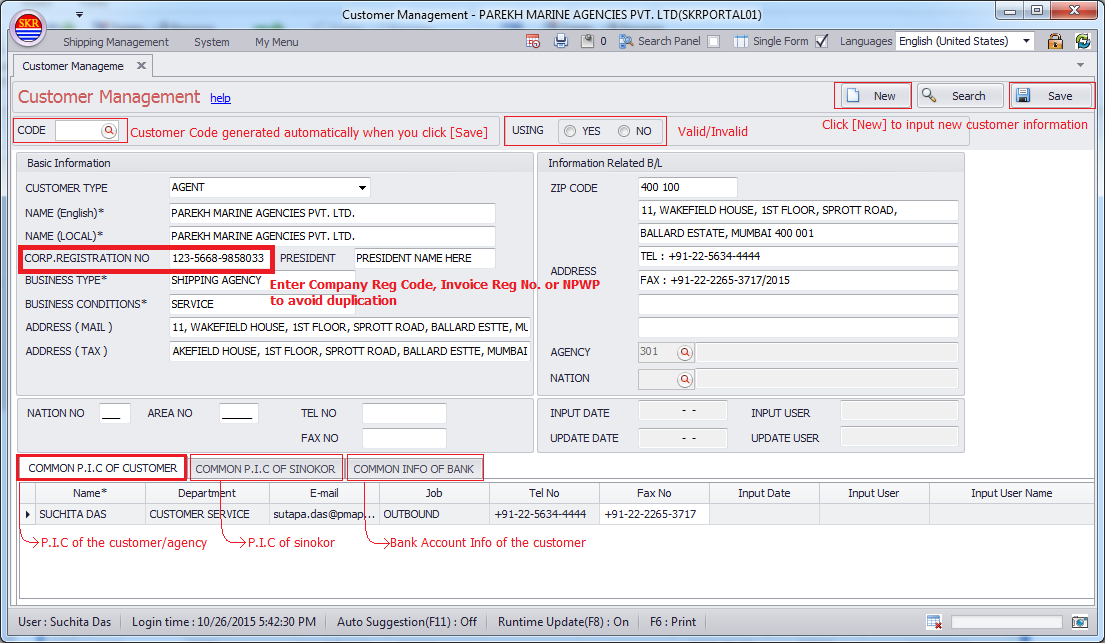
To avoide duplication of customer information, you should input 'CORP. REGISTRATION NO' or something like that.
Even though your customer doesn't provide you company reg No. for any reason, you should get TaxId or something like that which can distinguish between the specified customer and the others.
Caution
One company, Different Code is not allowd. So pls be careful when you input customer information.
Customer Code can't be deleted. If you don't want to use customer code, set "NO" at USING option.
Menu
Menu location : Shipping Management --> Customer Management
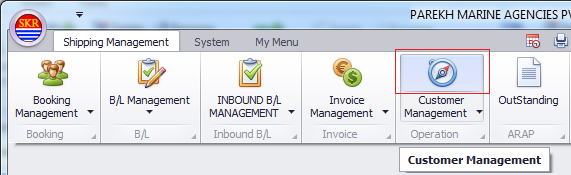
Menu screen
Input customer details and the click [Save] button. Then new customer code is generated automatically such as NAxxxx (NationCode 2digits + seq 4 digits).
Pls be sure to input 'CORP. REGISTRATION NO' to avoide customer duplication.
-end-