Advanced Filing Rules (♦)


SHMEDIAFRMGT
Advance Filing Rules (AFR)
Features
A vessel operator or a NVOCC (non vessel operating common carrier) should submit shipping information electronically on maritime container cargo
to be loaded on a vessel intened to entry into a port in Japan, to Japan Cutoms in principle no later than 24 hours before departure of the vessel from a port of loading.
P.I.C at last calling port for Japan should send AFR to Japan Customs 24 hours before vessel departure.
AFR Sending Process
send AMR --> send CMR (if needed) --> send ATD --> send ATD modify
process |
Comment |
|
AMR sending |
can send AMR by B/L number. |
|
CMR sending |
can send CMF if you have any modification on B/L. |
|
ATD sending |
should send ATD 24 hours before at Last Port bound for Japan. should send just one time after vessel sailing. |
|
ATD modify sending |
* Shipper send AHR to Japan Customs.
* After sending AMR sending, if the vessel schedule of specified B/L is changed, you have to send CMR-DELETE.
How to send AFR
Search data by vessel/voyage/POL/(POD).
Check B/L data and if there's no problem on B/L, click [Set Ready] button.
Choose one of the AFR type option (Original, Modify, Additional and Delete) and click [Send AFR] button.
If there're no problem with AFR sent data, send ATD before vessel departure.
Menu
Menu loaction : Shipment Management --> B/L Management --> Advalced Filing Rules
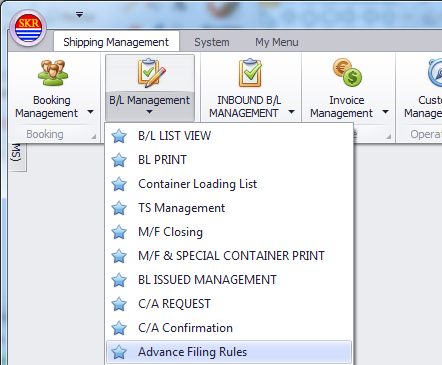
Menu Screen
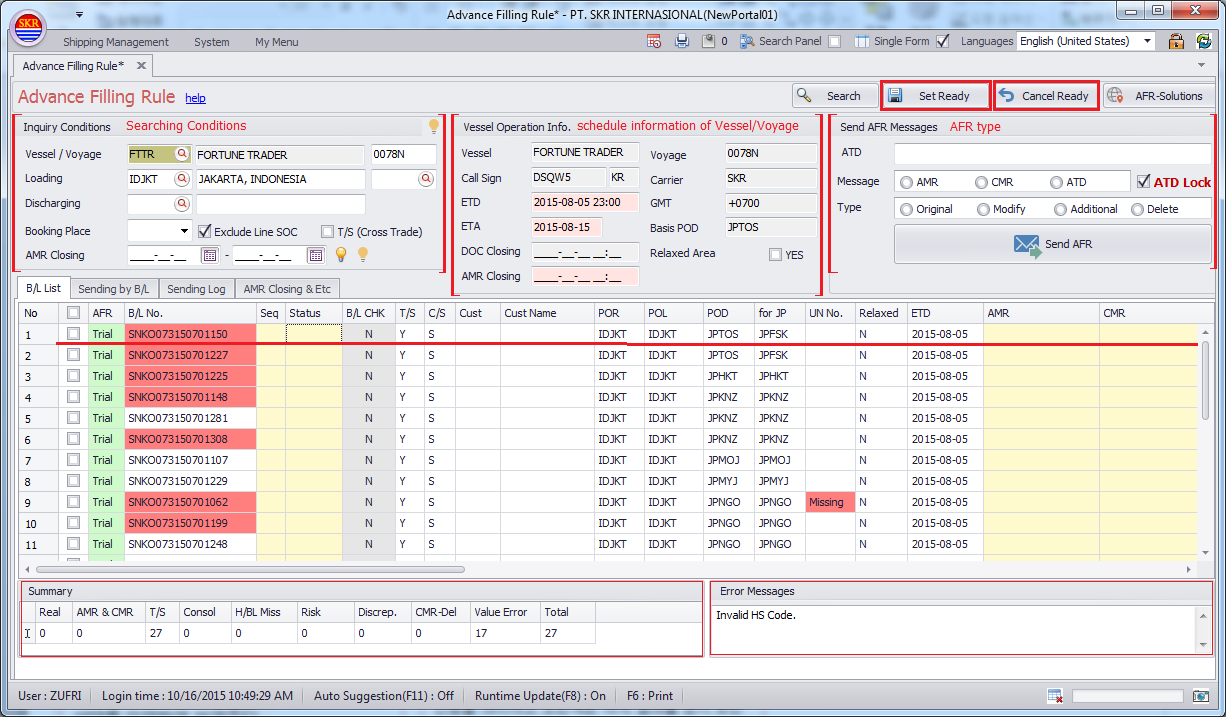
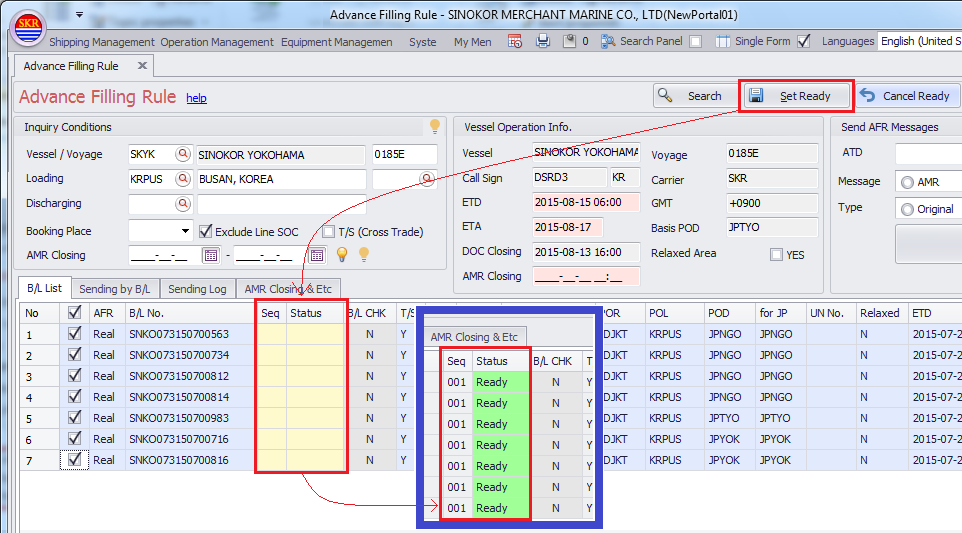
[Set Ready] button
Set ready before sending AFR.
If you click this button, new sequence for selected B/L(s) is generated automatically.
[Cancel Ready] button
cancel [Set Ready]
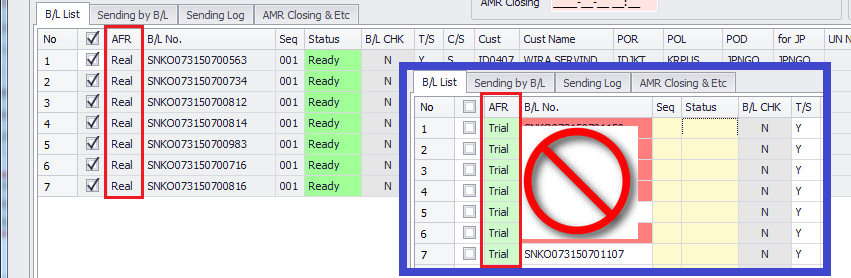
B/L List tab
AFR column : Trial - You can send AFR trial. If you see red color on B/L No. column, see Error Message on the right-bottom of the portal system.
Find the err reason and clear error.
AFR column : Real - Send AFR to Japan Customs after clearing Error Messages.
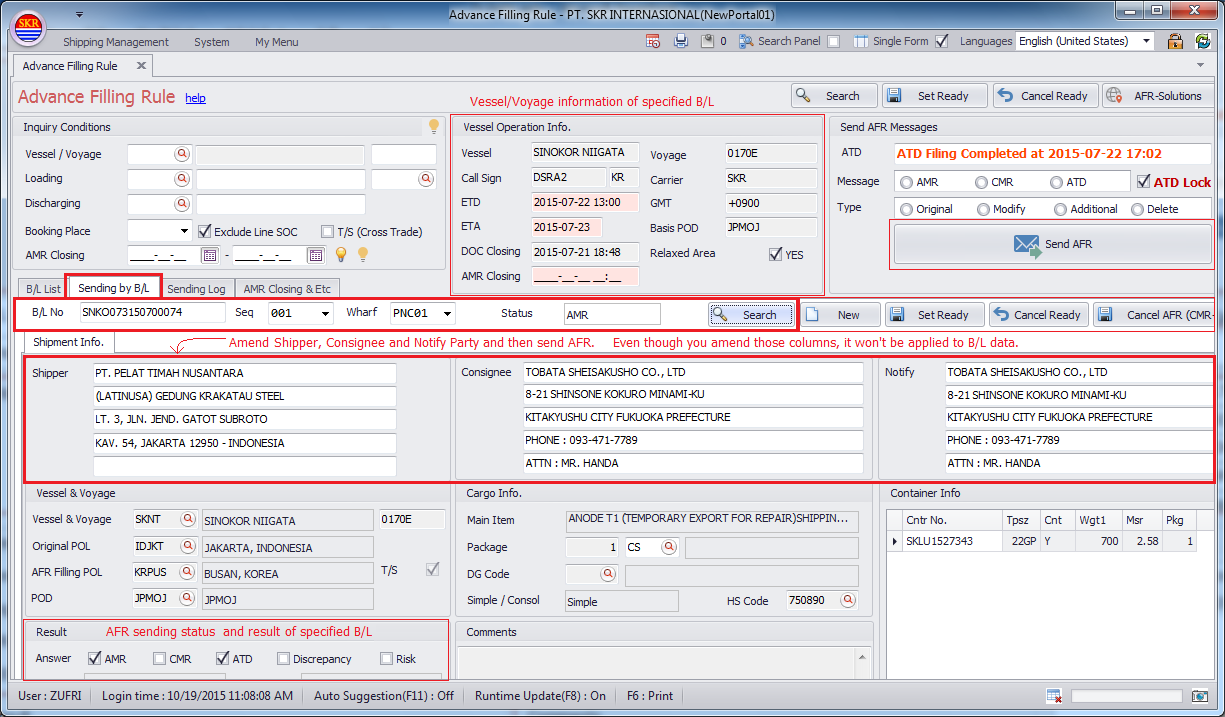
Sending by B/L tab
Input B/L number and click [Search] button.
You can send AFR B/L by B/L after modifying Shipper, Consignee and Notify Party under 'Sending by B/L' tab.
Even though you modify S/C/N (Shipper, Consignee and Notify Party) under this tab, it won't be affected to B/L data .
If you need to amend other columns of B/L, go to B/L Management.
If you check out shipper, consignee and notify party, click [Set Ready] button.
Choose AFR type under 'Send AFR Message' section, click [Send AFR] button.
If you need to cancel AMR due to vessel changing, input B/L and choose sequence and then click [Cancel AFR(CMR-DEL)].
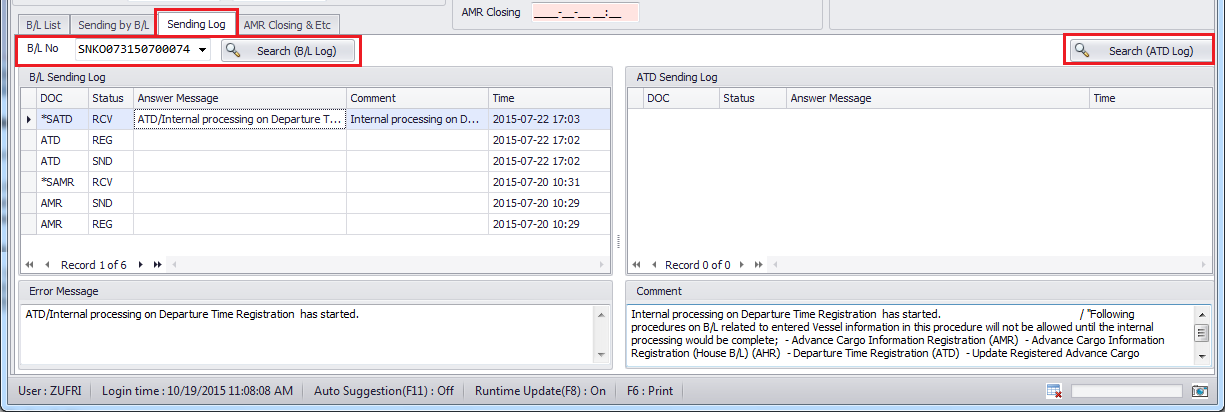
Sending Log tab
This tab displays AFR log by BL number and ATD log.
B/L Sending Log
Input B/L number and click [Search (B/L Log)] button then AFR sent log is shown.
If there're any errors, it will be shown on 'Error Message' section.
ATD Sending Log
Input B/L number and click [Search (ATD Log)] button then ATD sent log is shown.
If there're any errors, it will be shown on 'Error Message' section.
AMR Closing & Etc
If you register loading/discharging port as postponement, don't need to send AFR within 24 hours before vessel departure.
Postponement boundary is determined by Japan Customs.
Error Message
If specified B/L has inconsistent data for AFR, the reason is shown on Error Message text area.
AMR, CMR columns
Shows sending result of AMR and CMR.
Green - normal status.
Yellow - no message from AFR after sending AMR/CMR.
Grid Rows
If there's any problem with AFR response message, Gird row color is changed.
Red
Pls see 'Discrep' column (불일치)
Simple cargo - LINER send AMR to NACCS.
Consol Cargo - LINER and NVOCC should send AMR to NACCS.
If there's any discrepancy between LINER's and NVOCC's AMR data, NACCS send 'Discrepancy' message to AMR sender.
Clear discrepancy and send CMR.
If you send AMR with discrepancy, you'll be fined JPY 600 per one container.

Orange
Pls see 'Risk' column. (위험판정)
If you send AMR, you get one of three reponse message from NACCS - DNL, HLD, DNU.
You should clear them first. After clearing these issue, send AMR.
- DNL (Do not load)
- HLD (Hold)
- DNU (Do not unload)
If you send AMR with these three code, you'll be fined JPY 600 per one container.
Red on B/L number columns
Red indicates invalid status of AFR (전송 부적합).
System checks B/L data whether it's valid or not for sending AFR. Not an reponse message from NACCS.

AFR Column
Trial
In transhipment case, AFR column is shown as 'Trial' to POL users.
If you see red color on B/L No column, see Error Message on the right-bottom. Should find the reason of errors and clear.
(Note) AMR trial sending is no longer valid.
Real
In transhipment case, AFR column is shown as 'Real' to TS PORT users.
Direct shipment (non-TS shipment) case, AFR column is shown as 'Real' to POL users.
-end-