E-Mail & Fax Sender


SHMOPFAXSENDMGT
E-MAIL & FAX SENDER
Features
• This is used to send documents that is often used to customer by e-Mail or fax. (Fax can be used at Headquarters only.)
Type of document
• Arrival Notice
• B/K Notice
• Check B/L
• Copy B/L
• Invoice
• Freeday Notice
• Delay Notice
• Skip Notice
• Closing Notice
How to send document
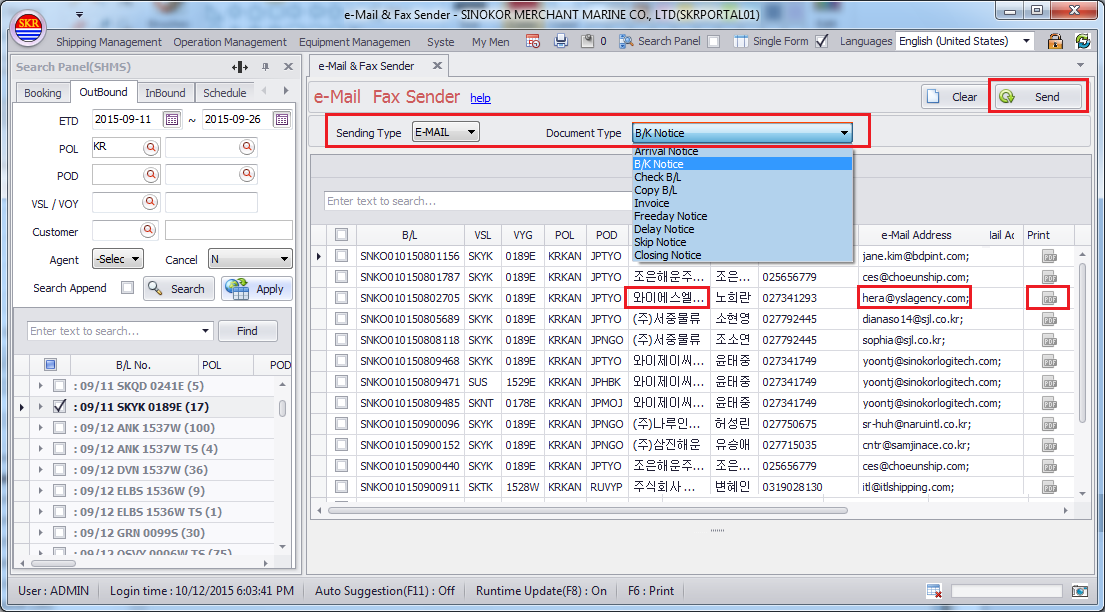
• Select the document type
• Search data
- Search the data to send document in search panel and click the [Apply] button.
- Right-Click on mouse and click the [Send e-Mail] (In Booking management, B/L management, B/L List, etc)
• Check the item to send and Click the [Send] button
e-Mail address
• Display
- In case of outbound (Booking, B/L, etc), e-Mail that is input in booking will be displayed automatically.
- In case of inbound (A/N, etc), e-Mail that is input in customer management(COMMON P.I.C OF CUSTOMER) will be displayed.
• Input / Modify
- You can modify e-Mail address in grid directly.
- Double-click the e-Mail address in grid, then you can find customer’s e-mails and select them.
- Double-click the customer name in grid, then you can view the customer management screen.
You can Input or Modify e-Mail in [Common P.I.C of customer] tab.
Pre-View
• Double-click the print icon in grid.
Menu
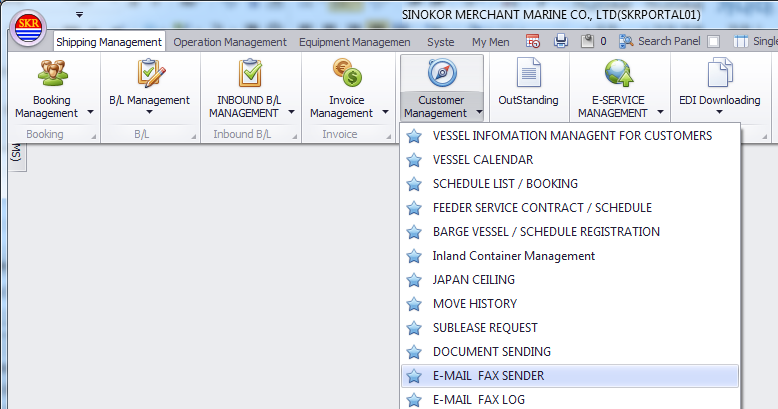
• Menu location : Shipping Management --> Booking Management --> Cancel Booking B/L Management
Select Sending Type and Document Type and the click [Send] button to send Document.
-end-